

Friday, 24 June 2016

HOW TO DESIGN AND BUILD YOUR OWN MOBILE APP

Source - fueled.com

Do you have a great idea for an app?
With the app ecosystem thriving, it’s an ideal time to transition your vision for an app into a reality. With a plan and guide, even an inexperienced entrepreneur or individual without coding capabilities can successfully produce an app.
We asked Fueled Strategist Perry Curac-Dahl to break down the process of building an app into four phases.
These four steps will take an app all the way from an idea to an in-market product, or Minimum Viable Product that is ready to be reviewed and improved.
What is a Minimum Viable Product (MVP)?
An MVP is the early version of an app or product that is developed only with the necessary and sufficient features to satisfy the early user. Typically, once feedback is received from users of the MVP, an app will be developed and designed with a more complete set of features. This guide will take you through the process of taking your idea for an app and turning it into an MVP.

PHASE ONE: IDENTIFY THE PROBLEM

Before enlisting the help of an app development agency, Curac-Dahl recommends taking the time to identify and hone in on “the underlying problem” that you want your app to mitigate. At this point, you don’t need to worry about the specific elements of your app such as its minor design details, but you should be strongly focusing on the issue that your app is here to fix. To succeed, your app needs to solve a problem or hold a value to the user, and a truly successful app will manage to do both. You want to focus on the problem, so don’t immediately jump into trying to determine the solution.
What if another app seems to deal with the same problem that yours aims to?
“Don’t let competition deter you,” says Curac-Dahl. “Competition shows that there is a market there” for your product and if your idea for an app is a good one, odds are that “multiple people are going to have the same idea.” Think about it: Seamless, DoorDash, Caviar and plenty of other companies offer restaurant food delivery. If you come across apps that seem to solve the problem that yours aims to, consider what will distinguish yours from competitors while still targeting the audience that is proven to exist by your competition.
Instead of worrying that you are too late with your idea, consider the benefits of second mover advantage. Moreover, by following similar products into the market, you can learn from their successes and failures to adapt your own app based on your findings.

PHASE TWO: DETERMINE A SOLUTION

20140115_3902KM
Once you have clearly defined the problem that your app will aim to solve, it’s time to begin formulating your solution. The first version of your product can’t possibly be anything more than a guess and at best, it will be an educated one. Only once it is out on the market can you receive external feedback that will be telling of its capabilities.
In order to present an educated guess in this first version, enlisting the help of experts is a must. Curac-Dahl recommends coming to a place like Fueled: “We have experts in the space who can help you develop an ideal first solution.” If you can afford it, working with an app development agency will provide you with expert insight and experience.

PHASE THREE: BUILD THE FIRST VERSION OF YOUR APP

big_thumb_443b883e839ba3fbee3be6a75ee70bd0
Now that you have a clear idea of the problem and the solution you intend to offer, it’s time to build the first version of your app and get it to market quickly. It’s extremely important at this point to build and launch a Minimum Viable Product that is high quality. With over one million apps available in the App Store and in Google Play, competition is high and low-quality apps with a substandard user experience won’t succeed.
Create a Feature Set:
Whether you are building your app yourself, with your own team, or with a development agency, you should create a feature set. A feature set is a written document that details the specifications of an app, including the design of the product and a description of the technologies needed for the project. A feature set will make it easier to communicate your product vision with team members, developers, and investors, and it will serve as a reference throughout the process of building the app. Additionally, the exercise of creating a feature set will help you to define and narrow your product.
Create a wireframe:
A wireframe is basically a blueprint or basic framework of the screens that will be included in your app. The easiest and quickest way to create a wireframe is by using pen and paper. At this point, you can begin imagining the physical features of your app. Try to draw out each screen of your product from start to end, and think about the experience you want your users to have when using it. While going through this exercise of creating a basic wireframe, remember to focus on your defined product and don’t get carried away envisioning unnecessary elements.
Your feature set should include:
  • An introduction to your product
  • The vision for your app in terms of the product, design, and business
  • A detailed description of the technical features of your app and each page of your app
Now it’s time to talk about coding.

TO CODE YOURSELF OR TO OUTSOURCE?

When it comes to coding an app, you have three options: you can either hire an app development agency to build and design your product, you can create your own internal design and development team, or you can build the app yourself.
If you can afford it, hiring an app development agency to build your app is your best bet. Because of their experience, a reputable development shop will likely deliver a high-quality app in a short period of time. If built by a well-regarded shop, your app will be worked on by a team of individuals, each of whom is an expert in his or her own field. These development and design experts are likely to have a good grasp on the ever-changing landscape of app competition and Apple Store acceptance, and they will use this knowledge to your app’s advantage throughout the development process. Here’s more on the price of developing an app.
Putting together a team of designers and developers is another way to approach building your app. While there are definite upsides to keeping development internal, the process of building a team is often time-consuming and expensive. Curac-Dahl warns that unlike the well-oiled machine of agencies, there is no guarantee that a team you have put together yourself “will work well together.”
It’s also possible to develop a first version app on your own. However, doing so requires having full stack developing capabilities (the ability to do both front-end and back-end development) – not to mention, a lot of time. Moreover, Curac-Dahl comments, “If any of these factors aren’t in existence, it’s beneficial to hire someone.”

PHASE FOUR: REVIEW AND REBUILD WITH MARKET FEEDBACK

Whether you’ve built your app yourself or have hired an agency to help you, once you are satisfied with your product, you can release it to the market. Although this is the fourth phase, you are still at a very early stage of the process to making a successful app. Only once your app is out will you be able to see its positive features and shortcomings, and only at this point can your product evolve and improve with feedback and input from the market.

WATCH YOUTUBE VIDEOS UPLOADED FROM YOUR LOCALITY

By Ishant Gupta
WATCH YOUTUBE VIDEOS UPLOADED FROM YOUR LOCALITY
It is quite possible that a YouTube celebrity resides in your locality! This could be someone from your locality who uploads YouTube videos. Probably, there might be a video about a school, park or temple of your locality or a video of places nearby your house on YouTube but you might not know about it. But you can now get all the YouTube videos of your locality at one place. A newly introduced web app, called as ‘Videos near me’, can help you to do just that. This app actually uses the Geo-tagging feature of YouTube and shows YouTube videos from around 2 miles of the chosen Google Maps location.

How to get ‘videos near me’
First, log on to this website:


This is an app which can show you all videos from one location without having to redirect to a different window. At the top, you will see Google Maps. You can select the required location by zooming it. For doing this, drag the ‘red marker’ and drop it at the required location. Then, it will automatically show the videos uploaded from that location.

UPLOAD PHOTOGRAPHS AND WIN PRAISE

By Ishant Gupta
UPLOAD PHOTOGRAPHS AND WIN PRAISE
Do you love photography? Then you must also be facing difficulties managing your photographs. You can make this tedious task easier with the help of photo sharing websites.

If you are a passionate photographer, you must be having a huge collection of photographs. In today’s world, almost everyone tries to perfect the art of photography using good smartphones and digital cameras. However, there arises a concern about storing these photographs.


It is not a bad option to store your photographs on your computer’s hard disk. However, the hard disk can crash at times or you might delete photos by mistake. Thus, it could be safer to save the photos online. The advantage is that you can download these photos from anywhere in the world. All this has been possible thanks to the photo sharing websites. 
The greatest advantage of these websites is that you can gain popularity as a good photographer in the online world. And it is the best way of sharing photos with your friends. For this, it is necessary for you to have an account on these websites. These websites now offer lot of features. Hence, with the help of these websites, you can show your talent to the whole world. Plus, it is very easy to work with these websites. You don’t need to understand any new technique additionally. If you want the world to know how good a photographer you are, you should take help of these photo sharing websites.

Using Flickr you can share your photos on Facebook, Twitter and on blogs. There are many ways to upload your photographs here. If you wish, you can directly upload a photograph from your mobile phone. It is also very easy to upload photos via email or web browser. World famous art photos are available on Flickr. You can choose between two types of accounts- free and paid. Using the free account, you can upload photos of upto 300 MB each month.

Here you have the online version of the photoshop software. You can add effects to your photographs with the help of this website. You also get a free space of about 2 GB to store your photographs. It also offers options like slide show and image gallery.

This website by Google offers many important apps. Most importantly, you can use the slide show creating tool to create an album of professional quality. Picasa also provides a photo sharing application. Once you download it on your computer, you can search photos on your computer and you can upload them. If you wish, you can also upload these photographs on Google’s social networking website Google Plus. Using it’s free account you can upload unlimited photographs.

Here you can create an album of your photographs. It’s free account allows to upload photographs of upto 500 MB and around 20 videos. Working with this website is extremely easy.

Using free account on Photobucket you can upload unlimited photographs. Just remember to keep the total size of photographs below 5 MB. You can also edit the photos and graphics. It provides an easy option of creating slide show of photographs as well as sharing photos with friends.

Thursday, 30 May 2013

GOOGLE ON THE PATH OF TECHNOLOGICAL REVOLUTION

By Ishant Gupta
Most of you must be using Google search on daily basis. Google is now coming up with a technology that will give us real time search results, thus making our work much simpler.

Not very far from now, you will experience a time where, by looking at one object through special glasses, you will be able to get all the information linked to that object instantly. Using these glasses you can take photos, chat and even update your Facebook status. Google is bringing these glasses for us. Google has christened this project as ‘Google Glass’. These glasses are based on augmented reality technique. As per this technique, the real world is connected with computer generated data, thus providing additional information to users. Similarly, Google Now is likely to win many hearts too.

Google Now : Help available
Google has launched Google Now, an intelligent personal assistant. It has been designed for Google’s Android operating system. It is being described as an extension of Google Search application. This application uses natural language user interface to provide results for the queries. It also provides you suggestions on various topics.  Interestingly, this application guesses what you are about to do on the basis of your search habits and takes appropriate actions. With the help of this application, you will be able to receive requested information real time. When you are equipped with Google Now, you don’t have to fret over browsing in the vast sea of information on internet. Instead, you can get quick and correct data. Google wishes to render the information real time in case of domains like the news, movies, public alerts, events, flights, translation, weather, sports, stocks and so on. Google Now is being seen as a big step in this direction.

Google Glass: Victory is yours
Recently, Google organized a competition for users all over the world. The competition ends with 8000 applicants being selected to receive the Google Glass.  Some time ago, only the employees at Google could use the Google Glass but now the gadget will reach other people too. You can get more information on Google Glass by loging on to www.google.com/glass/start. Here you will get to witness, via photographs and videos, the advantages of Google Glass and its functioning. By using Google Glass you can take a picture by just saying ‘Take a picture’. You can send a message by only voicing it, you can record what you are seeing, you can even find out the right direction. Other than that, you can receive instant information and latest updates about a particular place or thing. Google Glass is still in its initial phase, and thus, a lot is being expected of it.

Wednesday, 29 May 2013

PASSWORD PROTECTION FOR PDF

By Ishant Gupta

There are times when we have to share important and confidential information via PDF files. In such cases, it is necessary to ensure that only those individuals, to whom the file is addressed, read the file. Thus, it is a wise thing to protect the files with a password. Generally, any file can be password- protected using the settings. However, not everyone is familiar with this procedure. You can use the free and easy-to-use online service- ‘PDF Protect’.

How to use this service
First, go to the following website:

Here, you have to select the file, for which you want to set a password. Then, at a later stage, choose a password for this file. Once you select the ‘Protect’ option, your file will be in front of you. You can then save it to a directory of your choice and then share it with anyone you want. For using this tool, you neither have to perform any installation nor do you require any log-in.

Tuesday, 28 May 2013

SOCIAL CLOUD DRIVE FOR EASY SHARING

By Ishant Gupta
How do we share photos and videos on social networking websites like Facebook? We either use the facebook uploading feature or any other host website. In the world of cloud computing, social networking is also cloud based now. In other words, you can use the host website of the uploaded content to share your belongings on social networking websites. Some websites attract us through their simple interface. 'Shadow Drive' is a social cloud drive website of such kind.

Here's is how to use it
Go to this website-
www.shadowdrive.com. Here, you can log in with your facebook or twitter account. You can then upload your content (photos, music, videos and so on) on this website. Once that is done, with just one click you can share the content with your friends on facebook, or on any other social networking website. This sharing can be completely done from this website. It means that you don't have to visit facebook or twitter for uploading the content. You can even keep your uploaded content private if you want.

Wednesday, 8 May 2013

TV SHOWS NOW ON YOUTUBY INDIA TOO

By Ishant Gupta
TV SHOWS NOW ON YOUTUBY INDIA TOO
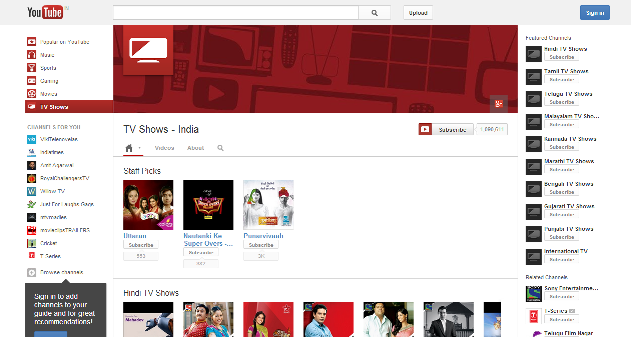
If you happen to miss an episode of your favourite TV show, don’t worry. Now, you can watch the recent episodes of many of your favourite TV shows on YouTube India’s official channel anytime and anywhere. It is just recently that YouTube has made all these TV shows officially available.
The quality of the videos is as good as that of the TV. The reason behind it is that, the TV channels themselves are supporting YouTube in broadcasting the shows. Especially for this purpose, a new ‘TV shows section’ has been created on YouTube. The shows here can be browsed as per their genre, and not as per channels that telecast them. For instance, ‘Tarak Mehta ka oolta chashma’ and ‘Comedy circus’ are available under the ‘Comedy’ category while ‘Bade achche lagte hain’ and ‘Adalat’ can be found under the ‘Drama’ category.

Here is how you can watch your favourite channels
Firstly, you have to log on to this website:


Here, you can watch not only the latest shows but you can also browse the old episodes. As of now, the shows from following channels are available here: Sony Entertainment, Star Plus, Colors and MTV shows. More channels are expected to be added to this list soon.

Monday, 6 May 2013

WOW! OS COULD WORK WONDERS!

By Ishant Gupta
After featuring in mobile phones and tablets, the smart operating system (OS) will soon make its presence felt in some quite unusual domains.

You must be aware of the operating systems used in your mobile phones. It was a general perception until now that operating systems like Android and Symbian are used just to enhance the speed of the mobile phones. Some years ago, operating system was used only in the domain of computer systems. But now, after having captured the domain of mobile phones too, operating system is ready to extend its wings further to cars, television, watches, refrigerators and microwave ovens. Thanks to the ever evolving technology, operating systems have been put to use in many electronic equipments. In near future, their presence will be witnessed in some unexpected places.
Cars
Currently, market has cars with entertainment system including GPS, touch screen, Bluetooth and multimedia capacity. But soon in the future with the help of Android, QNX or Linux, we will have such a system that will allow addition of lot of new services. There will be better control over various aspects of car such as suspension, seats and climate control. Also, with the help of the smart operating system, you will have location awareness, information about nearby accidents and traffic. If your car is stolen, you will be able to track it. Also you will get information about restaurant deals and locations.

Aeroplane
Currently, the in-flight entertainment system offers facilities like on-demand audio-video. But now, smart systems are ready to take one step ahead. These smart systems will be based on Android operating systems. This system gives you the option of web browsing along with checking emails. However, some international flights already have a paid Wi-Fi access. With the help of new smart systems you can plug-in a USB drive to watch your multimedia content. You can browse the food and drinks menu and place an order too. You can also browse through the duty-free selection. Additionally, you can get information about flights. You can also read newspapers and magazines from given selection.

Mirror
Mirrors with built-in screen are available in market these days. Once you turn off the screen, they work like normal mirrors. There is a new Android-based car rear view mirror technology. It has a touch screen. This new technology is expected to be out by early 2013. You can connect it with the Bluetooth of your smartphone to use it like a hands free device. You can also have a caller ID display on it if you wish.

Television
Google is now selling Google TVs. Using them, you can stream live TV on Internet. In addition to that, you can also obtain the audio/video content of your choice. You can use Android apps for this purpose. By connecting your mobile device to the In-television, you can get remote operation, scheduling and remote playback.

Refrigerator
Samsung has long been offering refrigerators in which, with the help of apps, one can download recipes, browse internet and update social networking websites. Not only that, they also feature a front mounted touch screen LCD to write important notes, for your family members for example. However, many more changes are expected to happen in this technique. With the upcoming smart operating system, you will be able to maintain a list of finished items in the refrigerator and also order them online. This refrigerator can communicate with other smart devices such as the microwave oven to suggest possible recipes based on the available ingredients. 

Watch
You can buy watch phones like GD910 by LG and watch phone by Borg. But these devices have the proprietary browsing system. This browsing system allows web browsing and is equipped with speech recognition system. Now, you can even buy the Android based smartwatch by Sony for 150 USD. You can connect it with your Android smart phone, and view the incoming calls, SMS, emails and other updates on the touchscreen of the watch. What’s more? This watch also displays the heart rate, location and can also be your fitness trainer.

Microwaves
In near future we will be able to witness smarter microwaves with wireless connectivity and operating system which will be controlled with a coloured touchscreen. You will not only control your oven using this system but also get cooking tips and download recipes. Also, you will be able to get suggestions about meals with the ingredients available in the house. It can also provide you the real-time calorie information. You can connect it with your smartphone and find out whether the food is ready or not. So, microwaves are now all ready to take on new roles.

Home security
Home security is becoming quite popular these days. With every passing day there are new developments happening in the systems. But in coming days, the home security systems will become more user friendly. You can connect it with your mobile phone. Using the many solutions available, you can use your mobile phone to remotely keep an eye on your house and to remotely enable or disable the system. But the good thing is that in near future this system will be based on smart operating system. This OS will resemble Android or Linux, which implies that you can add applications to it and get many things done through it.

Sunday, 5 May 2013

THE MANY ADVANTAGES OF Wi-Fi

By Ishant Gupta
THE MANY ADVANTAGES OF Wi-Fi
Your home Wi-Fi network usually serves one main purpose- that is internet surfing. However, you can do many more things with the help of the Wi-Fi router and broadband.

  • Using Wi-Fi you can make phone calls
  • You can turn your phone into a remote control using Wi-Fi.

Wireless printing
Wireless Printing
Wireless printing can be done in two ways. If you have a printer with a built-in Wi-Fi, you can do this very easily. If you already have a printer (without built-in Wi-Fi), you can buy a wireless router that supports wireless printing.
Canon Pixma MX416 printer (Rs.6995) has a built-in Wi-Fi. Connect it with your home Wi-Fi connection during the setup process. Then click on Install a printer and it will function like a network printer.
In order to connect your printer (without built-in Wi-Fi) or All-in-one printer with the home network, you can use ASUS WL-520GU router alongwith a USB print server (Rs.2500). You can connect your printer using the USB port provided at the back of this router.

Phone calls
Phone Calls
You can use Skype or Fring and make Voice Over Internet Protocol (VOIP) calls from your PC. You can also make VOIP calls using your mobile phone. You can use any Wi-Fi equipped phone and download Skype on it. You can make calls without using any SIM card. Skype-to-Skype calling is free. So, if your friend is sitting in some other country and has downloaded Skype application, you can make a free phone call to him or her. If you wish, you can buy a Wi-Fi handset, like the Belkin Skype Internet Phone (Rs.8000). You can then connect it to your Wi-Fi network and sign-in on Skype. Once done with this, you can easily make phone calls. One more advantage of using Skype phone is that you can be online all the time!

Smartphone or remote control?
If you wish you can turn your phone into a remote control as well. Today there are many internet connected devices such as Smart TV, Media players, Blue ray players and AV receivers that can work with Android and iOS applications. Using these applications, you can transform your portable device easily into a Wi-Fi remote control. Its greatest advantage is that it can work across the walls too. You do not even need to point it towards the TV. What is important is that the device and smartphone both should be connected through the same Wi-Fi network. For instance, if you have a Samsung Smart TV, you can use Samsung remote or Samsung SmartView app. And if you have WD media player, you can use WD app or free/paid third party apps.

Photo transfer
Photo Transfer
It often happens that while taking photographs, the memory full message flashes. But now, using a new gadget you can solve this problem. With the help of Eye-Fi SD memory card (starting from RS.2500), you can transfer files from camera to your PC. For this, you have to use the Wi-Fi network. When using it for the first time, you will have to first pair your device with your Wi-Fi network. You will also have to make a new folder in your computer where you will save all the transferred files. Then you can use the Eye-Fi card like any other memory card. Whenever you are near your home Wi-Fi network, the card will automatically start transferring the photos to the folder in PC. If you want, you can also get the option to transfer images to iOS devices via Wi-Fi.

Keep a watch on your house
With the help of home surveillance cameras, you can keep an eye on your house. It proves especially useful when you are going out of the house. Professional home systems are very expensive and the cabling arrangement required for it is also very complex. Instead, you can use the other option available to you. You can have a home surveillance with the help of wireless IP camera. It is very reasonably priced (Rs. 5000) and its functioning is easy too. It is an All-in-one unit. It just requires a power connection. You can fix it on any wall in Wi-Fi connection zone. It has a built-in infrared LED for night vision, a built-in microphone and a speaker for two way communication. You can control the device remotely.

File transfer
File transfer
If you want to share large sized files between computers, you can get it done speedily. Firstly, you must determine whether all your computers are in same work group. For doing this, go to Control panel, then go to System, and then Advanced system settings. Go to Computer name. Under Networking settings, enable Files and printer sharing. Then click the following boxes: Turn on network discovery, Turn on file sharing, Turn on sharing so anyone with network access can open, change and create files. After following these steps you will be able to see your computer under Computer networking devices. In order to share files, you just have to copy them to public folder. Other computers from the network can copy-paste from that folder.

Thursday, 2 May 2013

FIND OUT POSTAL ADDRESS WITH GOOGLE MAPS

By Ishant Gupta
FIND OUT POSTAL ADDRESS WITH GOOGLE MAPS
Sometimes, you know a place, but don’t know its exact address. In such a situation you cannot send a letter, parcel or courier to that location. But do not worry, there is a tool created with the help of Google Maps that can resolve this problem. Using this tool, you can search for a location and get the postal address of that region. Actually, this tool reads the latitude and longitude co-ordinates of the required location and shows the address of that location based on approximation technique.

Here is how you can find out an address
Go to below link:

Here, you will see ‘What’s the postal address’ tool. Firstly, search the place in the search box. Then you will see information related to the place on Google Maps at the bottom. By zooming it, you can get the address of the required place. Drag the red marker present in Google Maps and drop it on the required location. In this way, you can get the exact address of any location within minutes.

Wednesday, 17 April 2013

UPLOAD YOUR PHOTOS TO YOU TUBE AND PUBLISH AS A VIDEO SLIDE SHOW

By Ishant Gupta
You may think that to make a video slideshow, you will need to convert your pictures into a video format and then upload on the YouTube. But it’s not that complicated. You just need to drag and drop your images or photos on YouTube and they will be automatically converted to a slide show with amazing Pan and Zoom effects.
Earlier to do this you would have to use a tool like the Picasa or the Windows movie maker to join the image files together to make a video and then upload it on the YouTube. But now with advancement in technology, this extra step is not required. You can now directly convert your images into a video slideshow inside the YouTube.

How to Create a Photo Slideshow in YouTube


Once you access the YouTube website, click the Upload button and choose the option “Create” under “Photo Slideshow” option. Then click on the Upload Photos section and drag-drop all the pictures that you would like to be included in your slideshow. They could be your birthday, anniversary, farewell or picnic pics. They could also be the scenic images taken while on a long drive.
Once the photos are in timeline editor, you can arrange their position in the video by dragging them. The next screen gives you a default option to decide the duration of each image slide in the video. You also have the option to include transition effects of your choice in between the slides.  You can make your video musical by adding appropriate background music to the slideshow. But YouTube does not give you the option to upload audio files from your personal collection for the slideshow.
In case you wish to keep your slide show private, you can change the privacy settings to unlisted. This way no one can access your video on YouTube search. YouTube can include ads in your video if you have attached a background track to your slideshow. In that case you will have to share the revenue that is generated by your slide show with the music creator.

Friday, 5 April 2013

HOW TO USE ANY YOU TUBE VIDEO AS YOUR PAGE BACKGROUND

By Ishant Gupta
You saw the Bing homepage. You fell in love with the video background that was used in it. Yearning to make that video as your homepage background? You can easily embed the same video on your page background with small line of code.
HOW TO USE ANY YOU TUBE VIDEO AS YOUR PAGE BACKGROUND
Right now you must be using a dull boring static image as a background for your website. Want to make your website interesting and appealing? All you need to do is replace the static image with a new dynamic image with animations that will bring a fresh look to your website.
The Bing homepage uses interesting videos of animals which you too can use.
This can be done in many ways.
  • Bing uses the standard HTML5 <video> tags to serve videos on the homepage. The embedded video has a fixed size and it doesn’t resize itself with the browser.
  • There are ready-to-use jQuery plugins, Tubular and BigVideo.js for example, that let you easily use any video, or a series of videos, as page backgrounds.
  • The other more simple approach, as you can see in this demo, uses HTML and CSS tags (no JavaScript) to help you place any YouTube video in the page background.
YouTube Video Backgrounds
To start with, paste the code below near the opening <body> tag of your web template. You need to replace the ID with the video ID of the YouTube video that you would like to use in the background.

Internally, we are using YouTube’s IFRAME tags to embed that video such that it occupies the entire page (both width and height are set to 100%). Also, the z-index is set to negative so the YouTube video layer will appear several levels below the main content of your page.
The negative side to this is your background video won’t work on mobile devices and it is not possible to mute the sound of a video without using JavaScript.

Bonus Tip: Embed Background Music with YouTube
Do you recall the earlier Geocities era when the background music would be played automatically once any website is accessed. This would often embarrass you in front of your colleagues. These websites used raw audio files, like MP3, WAV or even the MIDI format, to embed music but you can now use any of your favorite YouTube tracks for embedding background audio to your choice of video background.
To do this you need to employ a trick. You need to embed a regular YouTube video (with autoplay=1) and set the height & width of the video player to zero so it stays invisible. This can be achieved with a single line of code which you can add anywhere on your web page.

Saturday, 30 March 2013

GREAT WAY TO KEEP YOUR GOOGLE CONTACTS UP-TO-DATE WITH GOOGLE SCRIPT

By Ishant Gupta
Many a times when you take a look at your Google contacts entries, you realize that there is so much matter missing. For instance in some cases residence and mobile phone numbers are missing, or at times mailing addresses, birthdays and anniversary dates of friends and family members are missing.

So the question is how do you complete your Google address book? Well there can be two options. One is you call up each of your friends and family members and get all their details and then enter them in your address book manually. How boring and tiring, isn’t it? But there is another interesting option. Ask them to directly update it themselves. Saves time and energy.

Update Google Contacts- Get your friends to do it.
It’s very simple. First select the contact name whose details are missing. Each selected contact is sent a unique URL which directs the person to a form on the web itself. They can now access the form and fill in the missing data themselves and submit the form on completion. The information is directly updated onto your Google account.

Steps to get started
Create a new group say ‘personal’ in your Google contacts list. Put the contacts of all your close family members and friends in this group. An automatically generated E-mail is sent their inbox which requests them to update their records in Google contacts. Then open the Google script and follow the steps below:

1. Choose File -> Make a Copy to create a copy of the script into your own Google Drive.
2. Update the values of NAME and GROUP variables with the actual values.
3. Go to File -> ManageVersions and save a new version.
4. Go to Publish -> Deploy as Web App, choose “Anyone, even Anonymous” under “Who can access the app” and click the Deploy button.
5. Go to Run -> Initialize to authorize the script. Choose Run -> Initialize to run the script.

[*] If you have trouble accessing the Google script, please download code.zip and copy-paste the content of the three files into script.google.com.

And it’s done in a blink of an eye. So all the people marked personal will receive an E-mail to update their information. Once they put all their information on the web form, you will be notified through an E-mail. The project is created using Google script and the entire source code is available online.

GREAT WAY TO KEEP YOUR GOOGLE CONTACTS UP-TO-DATE WITH GOOGLE SCRIPT
Screenshot A: Your friend gets an email requesting them to update their contact information.
GREAT WAY TO KEEP YOUR GOOGLE CONTACTS UP-TO-DATE WITH GOOGLE SCRIPT
Screenshot B: They can fill the form and their details are added directly into your Google Contacts.
If you want to discontinue with this facility, all you need to do is, open the Google script and un-publish the web app.

You can also add more fields to the web app form like birthdays, anniversaries, company name etc in addition to important details like mailing address, phone numbers, Skype/Fring/Nimbuzz ID etc.

Sunday, 24 March 2013

HOW TO CREATE A STRONG & UNIQUE PASSCODE FOR YOUR iOS DEVICES

By Ishant Gupta
Nowadays phones are used not only to make or receive calls but for many more reasons also. We use our phones to chat through gtalk/What’s App or to check and reply to mails, check account statements etc. All this demands a greater security for our phones.


Iphones, Ipads come with a special feature of passcodes to lock and unlock the screens. This restricts the use of phones in case the phones get into unwanted hands. The passcode for Iphone uses accented characters like ‘ä’ with two dots on top rather than a simple ‘a’. This can be made using a virtual keyboard of Iphone/Ipad. Tap and hold a key and you will get a list of related characters that have accent marks.

Make a strong and unique Passcode
The passcode that we use for our Iphones contains digits. But if we want to make a passcode that is difficult to guess, we can make use of these accented characters. E.g.  Oranges can also be written as Örängës. This makes it very difficult to guess and break the code.

This is an IOS specific feature. If you do not see the option to use alphanumeric characters as the passcode for your iPhone or iPad, go to Settings -> General -> Passcode Lock and turn off Simple Passcode.

This is an iOS specific feature. Android devices support alphanumeric characters for screen passwords but accented characters aren’t allowed. And in the case of Windows Phone 8, you can only use digits to lock /unlock the screen.

Related Posts Plugin for WordPress, Blogger...